A QUIETER KIND OF PROTECTION

Your clipboard.
Your business.

A little fortress for the things you copy.
Bastion catches secrets and clears tracking links, quietly from your Mac’s menu bar.

Made for macOS 14+ · Apple silicon

BASTION / LOCAL PROTECTION01—MAC
+
+
YOUR DATA STAYS INSIDE.
Interface illustration
On-device by design No analytics. No telemetry. Changes you can undo Native to your Mac

SMALL APP. THOUGHTFUL DEFAULTS.

Share the good stuff.
Keep the personal stuff.

Privacy shouldn’t be another task on your list. Bastion fits into the moments between copy and paste.

01 / SECRETS GUARD

Catch the key.
Before you share it.

API keys, access tokens, private keys, and passwords in connection strings. Get a quiet heads-up, or choose to mask them on the clipboard.

Notify by default. You choose what happens.
02 / CLEANER LINKS

The destination.
Without the baggage.

Strip common tracking parameters from copied links. Keep the parts that make the link work, like an article ID or a search query.

Clean automatically. Restore with one click.

STRAIGHT FROM THE MAC APP

Your settings.
Your call.

A familiar Mac interface, with the choices that matter. Here’s a look inside the current Bastion beta.

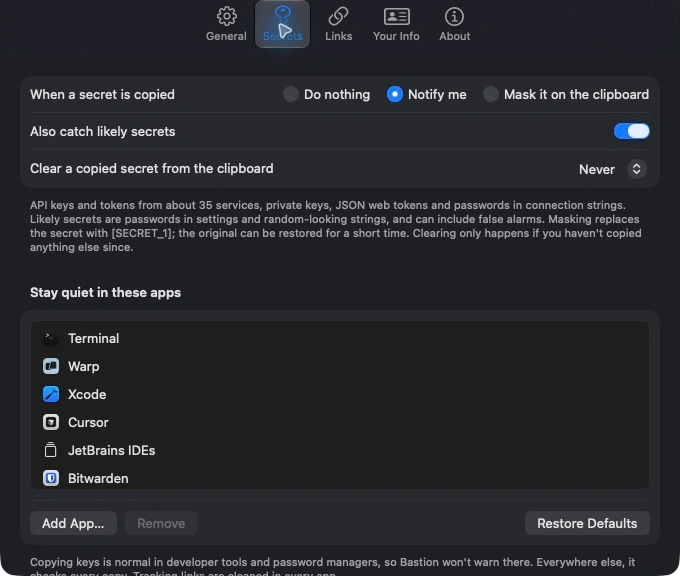
Bastion — Secrets
Bastion Secrets settings showing Notify me selected, optional masking, secret-clearing controls, and the apps where warnings stay quiet.
01 / SECRETS

A heads-up, on your terms.

Choose a notification or clipboard masking, and keep warnings quiet in the apps where copying keys is part of your work.

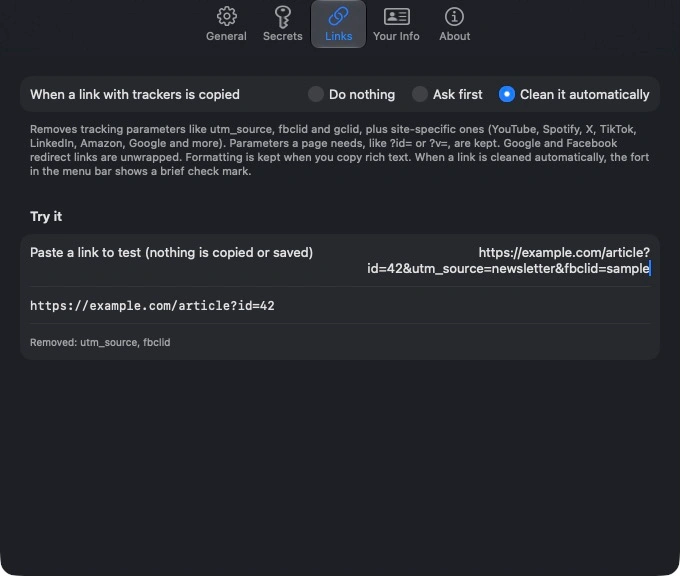
Bastion — Links
Bastion Links settings with automatic cleaning selected and a sample URL test removing utm_source and fbclid while keeping the article ID.
02 / LINKS

See exactly what gets cleaned.

Try a link in Settings. See the clean destination and the tracking parameters Bastion removed, before changing what’s on your clipboard.

Actual screenshots from the Mac beta. Link example uses fictional sample data.

A SMALL CHANGE. A BETTER COPY.

Less to share.
Less to worry about.

Take a look at two everyday examples. Same useful content. Fewer things you didn’t mean to send.

Interactive illustration using fictional examples.

YOUR CLIPBOARD
BEFORE BASTION
https://example.com/article?id=42&utm_source=newsletter&utm_campaign=weekly&fbclid=sample
The tracking can go. The useful part can stay.
PROCESSED RIGHT HERE

THE INTELLIGENCE INSIDE

A small model.
A meaningful boundary.

Meet Rampart Edge, made by
National Design Studio.

Bastion’s personal-information engine uses Rampart Edge to help identify names, addresses, and other personal details in context. It runs locally on your Mac, alongside pattern checks and your own private Your Info list.

The engine is built into BastionCore. Text-redaction and screenshot-scrubbing workflows are still in development.

Explore the Rampart Edge model
INSIDE YOUR MAC
01

Your Info

The people, places, and details you choose.

PERSONAL
02

Pattern checks

Recognizable formats. Validated details.

PRECISE
03

Rampart Edge

Personal information, understood in context.

ON DEVICE
Local detection. No cloud inference.

Rampart Edge model and validators by National Design Studio.
Released under CC0 1.0. Bastion is an independent application.

PRIVATE MEANS PRIVATE.

Your clipboard doesn’t need a cloud.

No analytics. No telemetry. No sending your clipboard away.
Optional update checks are Bastion’s only network use.

A FEW THINGS TO KNOW

Good questions.
Straight answers.

The current Mac app watches for copied secrets, cleans tracking parameters from copied links, supports undo, and includes a private Your Info list. Text redaction and screenshot scrubbing are planned features; they are not yet part of the app’s finished workflow.

Bastion app icon

BASTION FOR MAC · IN DEVELOPMENT

A little more private.
A lot more peace of mind.

A native menu bar companion for the things you copy and share.
Built for macOS 14+ on Apple silicon.

The beta is being prepared for direct Mac distribution.
A signed public installer is not available here yet.